An open floor plan is easy to love until the house needs to go quiet. The kitchen, dining area, and family room share the same air, so a dropped spoon near the island can feel close to the nursery, often right after lunch when crumbs sit under the high chair, and the baby has just fallen asleep. In this kind of home, the quietest robot vacuum is the one that stays predictable. Decibels help, but route, brush noise, dock bursts, and suction changes matter more. This guide walks through open-layout noise, suction balance, flooring and brush design, nap-time scheduling, room zones, and controls that protect quiet hours.
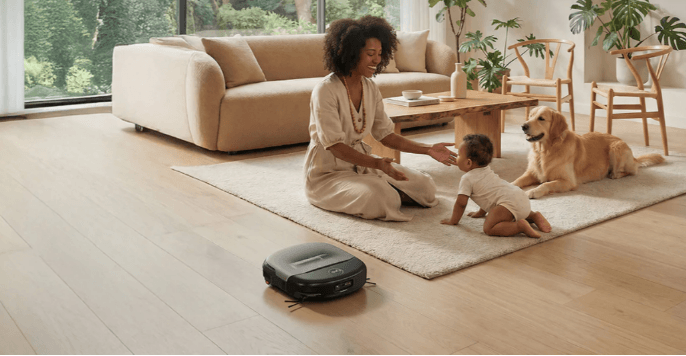
Robot vacuum cleaning wooden floor in cozy family living room with mom, baby and golden retriever
Table of Contents
- Why open floor plans make vacuum noise harder to hide
- Balance quietest robot vacuum settings with suction needs
- Match flooring and brush design to the sound you actually hear
- Time the clean around naps and light sleep
- Set room zones and a simple nursery check-in
- Choose controls that protect quiet hours
- Conclusion
Why open floor plans make vacuum noise harder to hide
Walls do a lot of quiet work. Without them, sound from the kitchen can travel straight across the main floor, bounce off hard flooring, and slip into a hallway before anyone realizes the vacuum has come close to the sleep area. Tall ceilings and glass doors make that effect stronger.
A robot can sound fine in a product video and still feel wrong in your house. The motor might be steady, but the side brush clips a chair leg, the wheels knock over a threshold, or the base empties dust right after the baby settles. Those little peaks are what parents remember.
Parents usually notice the problem in ordinary moments. That might mean cereal under the high chair right before nap, a living room that needs a pass while the nursery door is nearby, or a docking station that sounds sharper once the house is finally still. In homes like this, specs still matter, but they are easier to judge once you know where the robot runs, when cleaning happens, and how close it gets to sleep areas.
Balance quietest robot vacuum settings with suction needs
Decibel ratings are a useful starting point, but the harder choice is how much suction you can give up during quiet hours. A low-noise robot vacuum still has to collect real debris, so low or eco mode usually sounds gentler and works well for dust, hair, and light crumbs on hard floors. Max suction is better for rugs and heavier debris, but it also brings more motor noise and sharper changes in tone.
For homes with babies, the safest approach is often to split cleaning by time. Run quiet maintenance during naps and save stronger cleaning for when the baby is awake or out of the room. Then listen to the sound that actually reaches the sleep space. Quiet mode across the kitchen is one thing. A bumper touching the nursery wall is another.
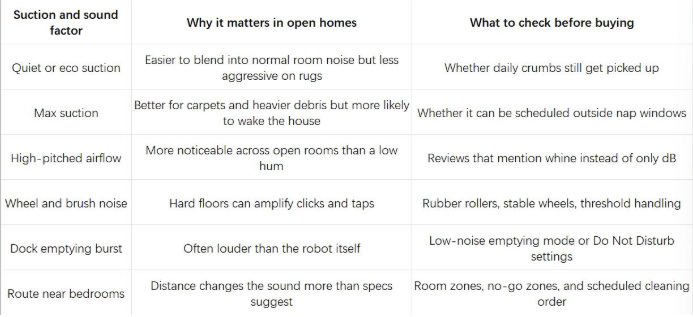
NIOSH describes decibels as a measure of sound intensity, but in a house, distance, duration, and suddenness often decide whether that sound feels harmless or disruptive.
Match flooring and brush design to the sound you actually hear
Flooring changes the sound before suction even enters the picture. On hardwood, tile, laminate, or vinyl, the robot rolls across a surface that reflects every small contact point. Grout lines click. A side brush taps baseboards. A stiff bristle roller can make a faint slapping sound on bare floors.
Carpet takes away some of that sharpness, then adds a different issue. The fibers soften wheel noise, but they also create drag, so the robot may slow down or raise suction on thicker rugs. The floor sounds calmer while the motor works harder. Rubberized or anti-tangle brush designs often make more sense in family rooms than dense old-style bristles because they avoid some of the scratchy contact that carries through an open space.
The useful comparison is not which surface sounds louder on paper. It is what you should change before the robot runs near a sleeping baby.
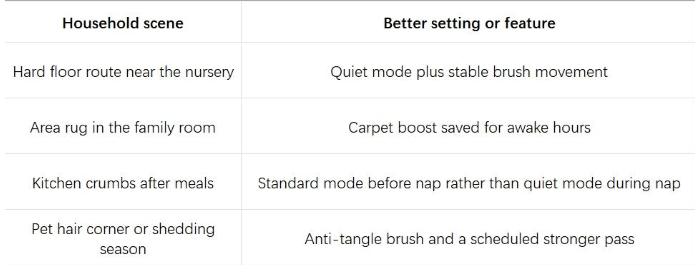
Once those checks are clear, browsing the eufy robot vacuums by floor type, mapping, self-emptying, and mopping style is more useful than comparing suction numbers alone.
Time the clean around naps and light sleep
Even a quiet robot needs a schedule that respects nap time. If you are shopping for a quiet model for nap windows, timing can matter as much as the sound rating. The American Academy of Pediatrics notes that babies do not have regular sleep cycles until about 6 months of age, and newborns may sleep only 1 or 2 hours at a time. That makes nap timing less predictable than a cleaning app can assume. A baby who settled quickly yesterday may stir today after the first small sound in the hallway.
If a nap is fragile, run the most disruptive rooms before the baby goes down. The kitchen, entry, and dining area usually collect the most debris anyway. Once the room is quiet, keep the robot away from the hallway outside the nursery unless the layout gives you enough distance.
For unavoidable nap-time cleaning, start away from the sleep area and keep the route simple. Let the robot handle the kitchen or the far side of the living room first, use quiet or eco mode, and save high suction for errands, outdoor time, or after the baby wakes. If the station has a louder dust collection cycle, schedule that part for daytime rather than letting it fire right after a quiet run.
A short delay can help in some homes. Waiting 25 minutes after the baby falls asleep gives sleep a chance to deepen before wheels start moving, though this is not a rule that works for every child. If the first run wakes the baby, change the route or the timing before blaming the machine.
Set room zones and a simple nursery check-in
Once you know when the robot should run, the next question is where. Room zones and no-go zones turn those nap-time rules into a saved map, so you are not picking rooms from scratch with a tired baby on your shoulder.
A baby monitor fits the same idea. Parents often peek into the nursery because they are unsure whether a sound woke the baby. A reliable monitor lets you check breathing, stirring, and room status without opening the door or stepping on a creaky floorboard. That small habit matters in open homes, where one sound often leads to another. Once you know whether you want a local screen, app access, or pan-tilt coverage, the eufy baby monitor is a useful place to compare models side by side.
You might save four presets and tap the right one instead of rebuilding the map each time.
- Nap preset: kitchen and entry only, quiet mode, no hallway.
- After-meal preset: dining and high-chair area, standard mode if the baby is awake.
- Away-from-home preset: deeper clean, higher suction, dock emptying allowed.
- Night preset: only if the dock and route are far from bedrooms.
Smart cleaning does not have to mean more cleaning. It can simply mean fewer bad moments.
Choose controls that protect quiet hours
For families with babies and open floor plans, the useful robot is one you can actually control day to day. Daily crumbs and dust still need attention, but the loud parts of the job need boundaries. With the eufy Robot Vacuum Omni S2, the point is not to run every feature during nap time. It is to use the right feature in the right window.
Save the 30,000 Pa AeroTurbo™ 2.0 suction for rugs, pet hair, and high-chair crumbs when the baby is awake or out of the room. CleanMind AI with 3D MatrixEye 2.0 helps the robot work around toys and cables, while room controls let you keep it away from the nursery hallway. HydroJet™ 2.0 and the 12-in-1 UniClean™ Station cut down on hands-on cleanup, so station tasks can stay on a daytime schedule instead of the nap window.
Suction still matters, especially around rugs and crumbs. In a home with a baby, max power may be more useful as a scheduled setting than an all-day default. A better routine is quieter daily maintenance with stronger passes saved for the times when the baby is awake, the house is empty, or the robot can stay far from the sleep zone.
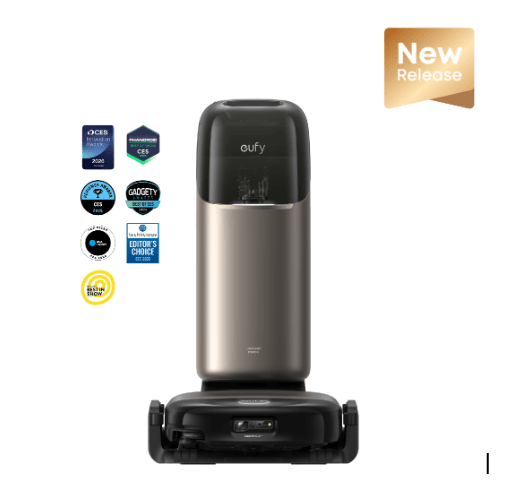
eufy Robot Vacuum Omni S2
Conclusion
The quietest robot vacuum is the one that stays predictable in your rooms. A low decibel number helps, but wheel clicks, brush chatter, suction changes, and dock emptying are often what wake the house. Test the noisy moments along with the steady hum. If the route, mode, dock placement, and nap schedule fit together, the vacuum can become background maintenance instead of another sound everyone has to manage.